Fitting RAG in Your Pocket: Local Retrieval in React Native
Build a complete Retrieval-Augmented Generation pipeline that never leaves the phone: local embeddings, native vector search with nitro-sqlite + sqlite-vec, and local generation using React Native.
Ritesh Shukla
Software Engineer @ Margelo
Open almost any app today and there's probably an AI chatbot that already knows you. Ask your food-delivery app "what did I order last Friday?" and it answers from the history of your orders, not the whole menu.
I know some of you might have wondered: "What sort of sorcery is that? How is it possible?" - but no, it's not magic, it's something called RAG.
Retrieval-Augmented Generation (RAG) is the process of optimizing the output of a large language model, so it references an authoritative knowledge base outside of its training data sources before generating a response. Source
Let's build something similar using React Native, but for your own chats: export a WhatsApp conversation, feed it to an AI, so you can ask questions in plain language and get answers from the actual messages. The one rule: everything runs on device. No server, no API key, no per-token bill; on a $100 Android phone in airplane mode, it still works.
If you want an example of cloud-based RAG, consult this other blog post authored here at Margelo!
Ready? Let's go!
RAG needs a brain 🤖
We start from a basic chat screen: a message list, an input box, and a send handler that hands the conversation to a model and renders the reply. (We built exactly this in a previous post, if you're interested in the UI side.) In a typical AI chat app that model lives on a server, and that's the easy version: one fetch and you're done. But it breaks our one rule, so the first move is swapping the server model for one that runs on the device.
Generation runs on a small on-device LLM: Qwen2.5-0.5B-Instruct, a 4-bit GGUF loaded through @react-native-ai/llama, which wraps llama.cpp. It's deliberately small, 469 MB at Q4, because it has to fit inside a cheap phone's memory, not a datacenter. Loading it is one call:
import { getModelPath, llama } from '@react-native-ai/llama'

const MODEL = 'Qwen/Qwen2.5-0.5B-Instruct-GGUF/qwen2.5-0.5b-instruct-q4_k_m.gguf'
const qwen = await llama.languageModel(getModelPath(MODEL)).prepare()
Now, how does the chat get in front of it? The obvious albeit rookie way: read the whole WhatsApp export, give it to our LLM, and then ask the question.
const chat = await loadWhatsAppExport()   // the entire _chat.txt, as one string
const { text } = await qwen.completion({
  messages: [
    { role: 'system', content: 'Answer questions about this WhatsApp chat.' },
    { role: 'user', content: `${chat}\n\nQuestion: ${question}` },
  ],
})
The model reads the whole conversation as its context and answers from it. Simple. Right?
Testing our hypothesis
Let's load a real export, ask a plain question, and see what comes back. We'll use a WhatsApp export, a few months of everyday chat between two friends: work banter, cricket, a weekend trip that got planned, cancelled, and re-planned across dozens of messages. Then we ask something genuinely buried:
Who ended up paying for the hotel?
Not a date lookup. The chat is full of hotel talk, two different hotels got booked and one got cancelled, and the messages that actually answer this say "I put the room on my card" and talk about "the cottage", never the word "hotel". We'll come back to why that matters.
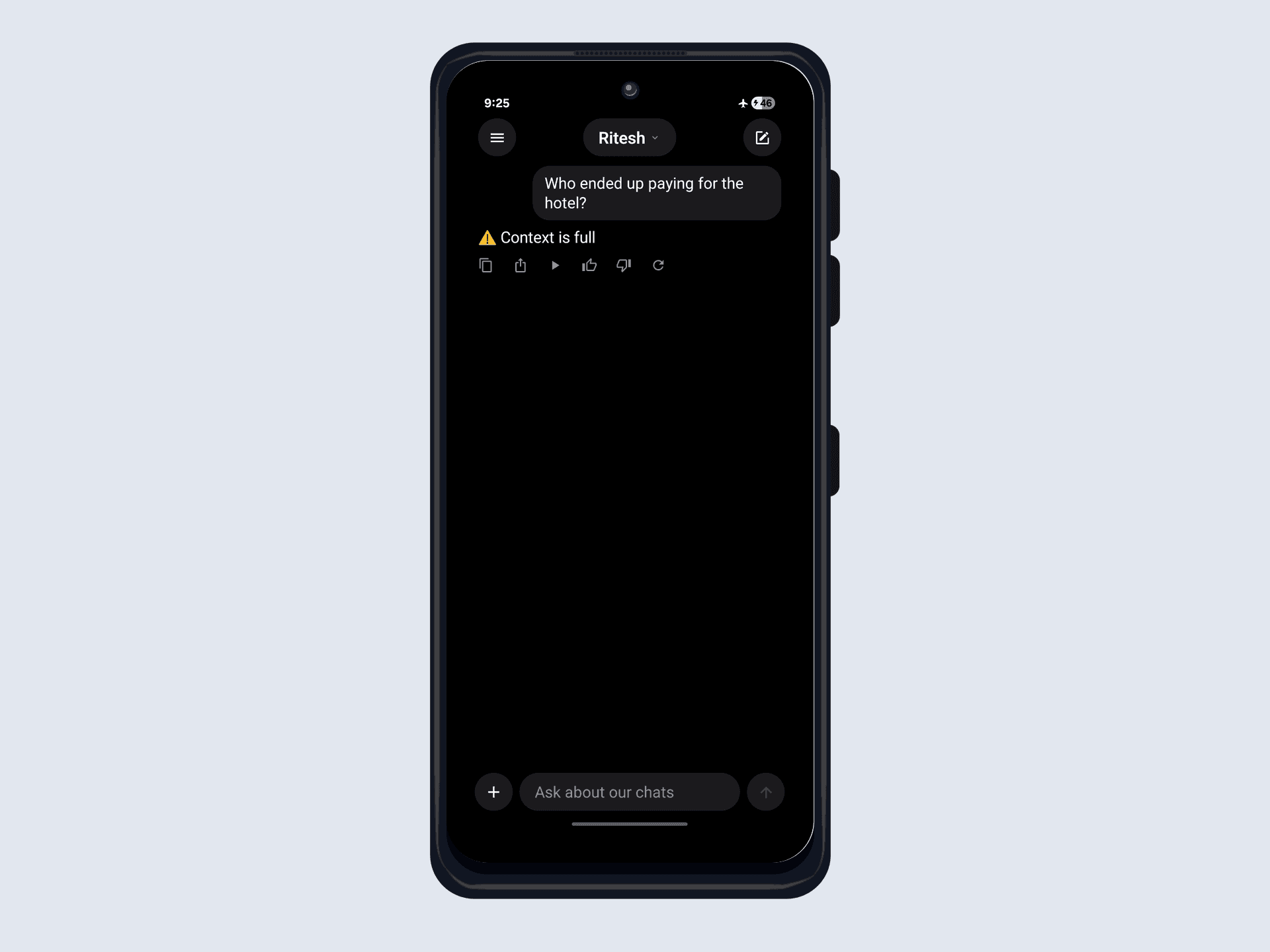
Oops. The model never even gets to answer. Why?
Every LLM can only read so much at once: its context window, measured in tokens. Qwen2.5-0.5B can natively stretch to 32,768 tokens, but a phone can't afford that window. It is paid for in RAM, the KV cache the model holds for every token in the window, and that cost grows as the window does. With the 469 MB model already resident in ~900 MB of usable memory, and headroom needed for machinery we'll add later, we cap the context at 4,096. Our WhatsApp export is over 21,000 tokens, so it doesn't fit. Not "slow," not "truncated": rejected outright. llama.cpp refuses the request and reports Context is full, and the model never sees a single message.
The context window (or "context length") of a large language model (LLM) is the amount of text, in tokens, that the model can consider or "remember" at any one time. Source
So what are the options? A bigger window? The window is that KV cache; 32K of it won't fit next to the model in this phone's RAM, and a year of messages sails past 32K anyway. A bigger model? Worse: more weights leave even less RAM for the window, until the process just dies. A cloud model? The whole chat fits, but the messages leave the phone, it stops working offline, and you re-send all 21,000 tokens, paid per token, on every single question.
The real fix: send less, not more
Every option above tries to fit the whole chat somewhere, a bigger window, a bigger machine, someone else's server. But look at the question again: "Who ended up paying for the hotel?" The answer is one or two messages out of thousands. We never needed the whole chat in context. We needed those two lines.
So instead of dumping everything, we retrieve the few relevant messages first, then hand only those to the model. That's where RAG comes in: look the facts up before you answer, and answer from what you found.
The hard part is those few relevant messages. Given a question you've never seen before, how do you find the lines that answer it?
Building the retrieval pipeline
Finding those lines is a pipeline of its own, so let's build it a piece at a time.
Retrieval by meaning: vector search
Let's take it one step at a time. First idea: split the chat into small chunks, a few messages each, and for every question pick only the chunks that could answer it. The plan is sound; the whole problem collapses into which chunks?
The obvious attempt is keyword matching: grep the chunks for the words in the question. It falls apart on the first real query. Someone asks about the "electrician" when the message says "the guy coming to fix the lights," or types "hackathon result" when the chat says "secured 2nd place." Match on words and you miss every synonym, every nickname, every switch of language. You have to match on meaning.
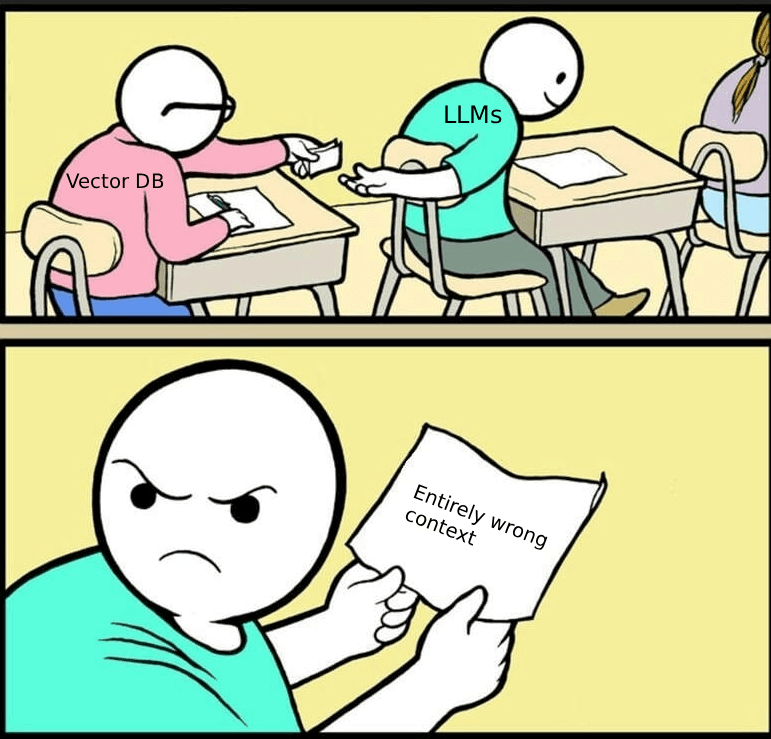
We need something more solid, and that's where embeddings come in. The word is heavier than the idea: represent each chunk as a list of numbers, a vector. Picture it in 3D first: a vector is just three coordinates, a point with a direction, and we arrange things so chunks with similar meaning point close together, "the guy fixing the lights" near "electrician", unrelated text far apart.
A real embedding model does exactly this, just in hundreds of dimensions instead of three, and it has already learned which texts belong near each other, so we don't touch the math. Embed the question with the same model and search stops being string-matching and becomes geometry: find the chunk vectors nearest the question's vector.
Here's the whole pipeline, ingest on top and query on the bottom, meeting at the database:
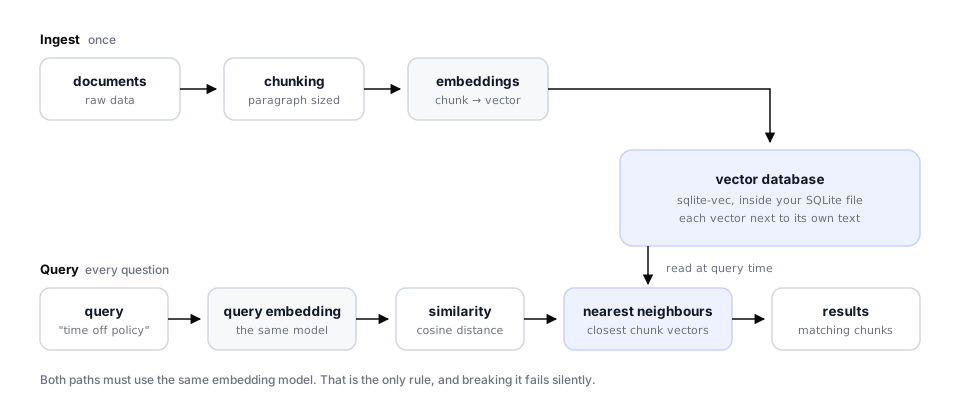
Walking through each stage:
- Documents: the raw data: here, the WhatsApp messages.
- Chunking: each document split into chunks. Smaller retrieves more precisely, but overdo it and you lose surrounding context.
- Embedding: each chunk turned into a vector (curious how? Callstack's primer on local embeddings is a great start).
- Vector database: stores the vectors, runs the similarity searches.
- Query embedding: the question through the same model.
- Similarity metric: the closeness math (cosine similarity, dot product).
- Nearest neighbour search: the closest chunk vectors to the query.
- Results: the matching chunks, ready for the LLM (each chunk's text is stored next to its vector, so a hit carries the original text with it).
Turning SQLite into a vector database
The whole pipeline hinges on one component being fast on a phone: the vector database sitting in the middle of that diagram. At Margelo we have built a number of offline-first apps. That demands a fast local database, which is why we built react-native-nitro-sqlite, an SQLite library that talks to native SQLite over an optimized JSI pipeline (ie, nitro) with almost no overhead.
As local AI took off, these offline-first apps needed vectors. A separate vector store would mean a second database to keep in sync with the first, its own query language, and another engine baked into the app binary. So rather than bolt on a separate store, we compiled sqlite-vec straight into nitro-sqlite. The result is a vector database inside the same SQLite file your app already uses: no service, no runtime extension, KNN running natively over JSI. If you're curious how we wired sqlite-vec into the build, this PR has the full story.
Enabling the vector database
Install and rebuild the native app:
npm install react-native-nitro-sqlite react-native-nitro-sqlite-vec react-native-nitro-modules

# iOS: the NITRO_SQLITE_VEC flag tells the pod to compile sqlite-vec in
NITRO_SQLITE_VEC=1 npx pod-install

# Android: add `nitroSqliteVec=true` to android/gradle.properties

# rebuild: these are native modules, a JS reload is not enough
npm run ios      # or: npm run android
Once the flag is set, sqlite-vec is statically linked into nitro-sqlite's SQLite: nothing to fetch, nothing to load at runtime. Confirm it's live from JS:
import { open } from 'react-native-nitro-sqlite'

const db = open({ name: 'ragchat' })
const { rows } = db.execute('SELECT vec_version() AS v')
console.log('sqlite-vec', rows?._array?.[0]?.v) // e.g. "v0.1.9"
Creating the table
sqlite-vec adds a vec0 virtual table: one fixed-size vector column plus auxiliary columns (prefixed +) that ride along with each row and come back in your KNN results. So we store the chunk text and source next to the vector, no JOIN needed:
db.execute(`
  CREATE VIRTUAL TABLE IF NOT EXISTS chunks USING vec0(
    embedding float[384] distance_metric=cosine,  -- must match the model's output size
    +content  text,         -- the chunk we'll feed back to the LLM
    +source   text          -- where it came from
  );
`)
That 384 is the output dimension of the embedding model, and column width and model must agree. In a real app, name the table after the embedder, not the dimension (chunks_minilm, not chunks_384): two 384-dimension models produce vectors that are equally valid and mutually incomparable, so a width-keyed table will silently accept vectors from a model you swapped out last week. No error, just a wrong answer waiting downstream. (We'll keep the short chunks here so the snippets stay readable.)
Chunking the conversation
Chunk too aggressively and you tear a fact from its subject; don't chunk and you blow the context window. A chat log has a natural unit that a PDF doesn't: a burst of messages on one day. So we pack consecutive messages into small windows, and force a new window whenever the day changes, so two unrelated threads never share a chunk.
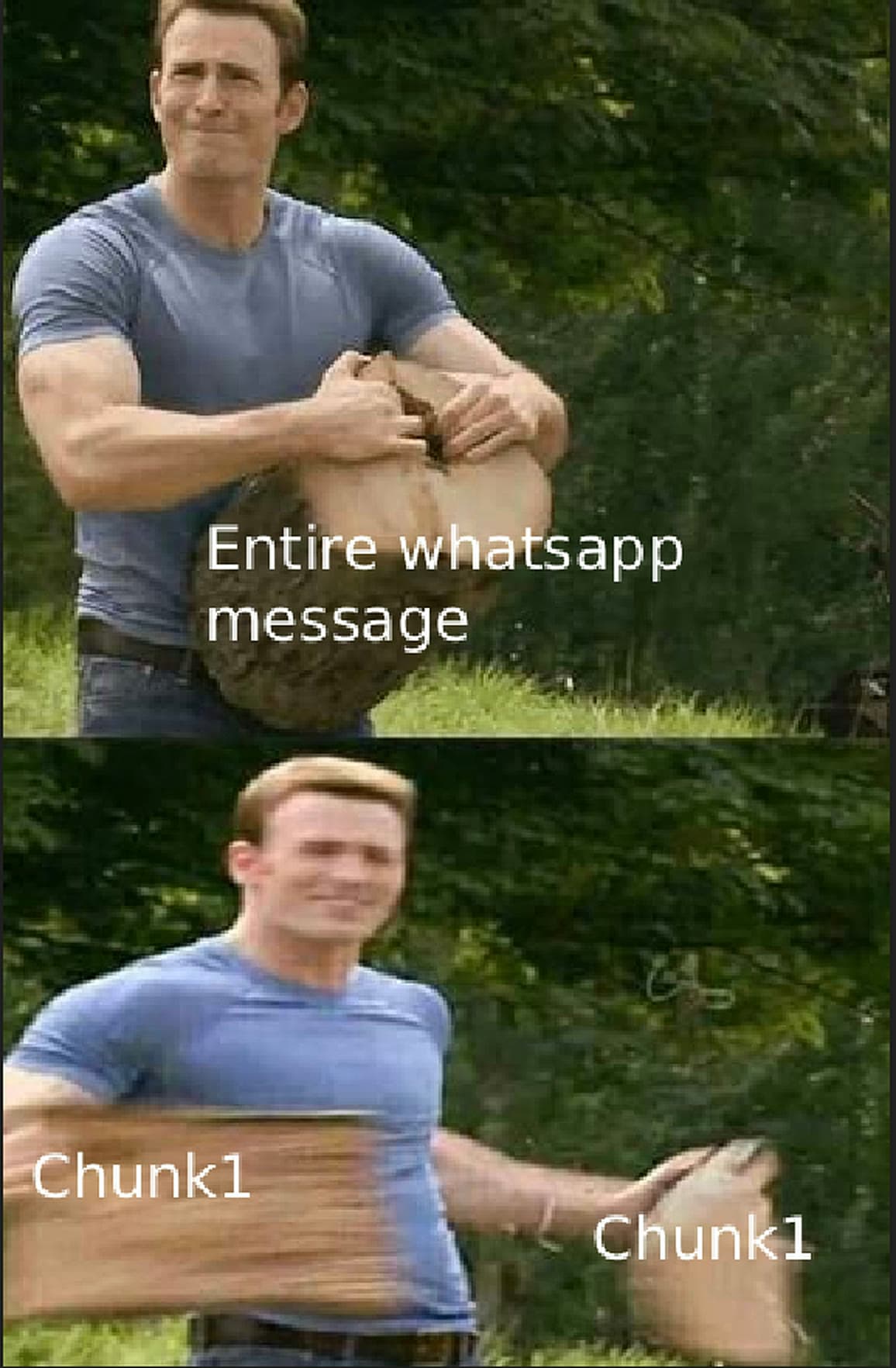
Each line keeps its sender, because "who said it" is half of what you'll want to ask:
const MAX_CHARS = 200        // a window: a few messages of back-and-forth
const HARD_MAX_CHARS = 600   // no single line may exceed this, see below

function chatToChunks(messages: Message[]): string[] {
  const chunks: string[] = []
  let buf: string[] = []
  let day = ''
  const flush = () => { if (buf.length) chunks.push(buf.join('\n')); buf = [] }

  for (const m of messages) {
    // Split the *message*, not the finished window: every part must keep its
    // "Sender:" prefix, or the tail of a long message arrives with no speaker.
    for (const part of splitLong(m.text, HARD_MAX_CHARS)) {
      const line = `${m.sender}: ${part}`
      if (buf.length && (m.date !== day || buf.join('\n').length + line.length > MAX_CHARS)) flush()
      day = m.date
      buf.push(line)
    }
  }
  flush()
  return chunks
}
That comment cost me an evening. My first version split the finished window, so a 3,900-character trip itinerary got cut in half and the second half lost its Ayush: prefix. Ask about anything living in that tail, "who has the printed tickets?", and the model, with no speaker in the context, confidently attributes it to the other person. The retrieval was perfect; the chunker had thrown the answer away.
Embedding on the device
This is the heart of the pipeline: turning a chunk of text into a vector of 384 numbers, on the device.
You don't need a second ML runtime for this: llama.cpp runs an embedding model as happily as a chat model, so the same engine that generates our answers also produces our vectors, one dependency, one set of build flags. Load the model with embedding: true and call .embedding():
import { getModelPath, llama } from '@react-native-ai/llama'
import type { LlamaContext } from 'llama.rn'

const EMBED_MODEL = 'mykor/paraphrase-multilingual-MiniLM-L12-v2.gguf/paraphrase-multilingual-MiniLM-L12-118M-v2-Q4_K_M.gguf'
const DIM = 384

// Cache the *promise*, not the context: a second call mid-load awaits the
// same load instead of orphaning a ~120 MB native context.
let ctxPromise: Promise<LlamaContext> | null = null
function embedder() {
  ctxPromise ??= llama.textEmbeddingModel(getModelPath(EMBED_MODEL), {
    normalize: 2,                            // L2, so cosine == dot product
    contextParams: { embedding: true, n_ctx: 4096, n_gpu_layers: 0, n_threads: 4 },
  }).prepare()
  return ctxPromise
}

export async function embed(texts: string[]): Promise<number[][]> {
  const c = await embedder()
  const out: number[][] = []
  for (const text of texts) {
    const { embedding } = await c.embedding(text, { embd_normalize: 2 })
    out.push(embedding)                        // already mean-pooled and normalized
  }
  return out
}
The model is paraphrase-multilingual-MiniLM-L12-v2: 384 dimensions, ~119 MB at Q4, trained on 50+ languages. I reached for a plain English all-MiniLM-L6 first, since it's smaller and it's what everyone benchmarks. Then I pointed it at my own real export, which switches languages mid-sentence, and it was useless: messages outside English collapsed to nearly the same vector and every search came back noise. If there is any chance your users' chats aren't pure English, the multilingual model is worth every megabyte.
Storing the vectors
Chunk, embed, batch insert. sqlite-vec takes the vector as a JSON array string, and executeBatch writes every chunk in one native round trip:
export async function addConversation(messages: Message[], source: string) {
  const chunks = chatToChunks(messages)
  const vectors = await embed(chunks)
  db.executeBatch(
    chunks.map((content, i) => ({
      query: 'INSERT INTO chunks(embedding, content, source) VALUES (?, ?, ?)',
      params: [JSON.stringify(vectors[i]), content, source],
    })),
  )
}
The conversation is now searchable on the device; call addConversation again to add another chat.
Answering a question
Now the query side. Say we ask: "Who ended up paying for the hotel?"
Embed the query with the same model, then run the KNN search. sqlite-vec's MATCH ... AND k = ? does nearest neighbour natively inside SQLite, no JS loop:
export async function retrieve(query: string, k = 3) {
  const [queryVec] = await embed([query])
  const { rows } = db.execute(
    `SELECT content, source, distance
       FROM chunks
      WHERE embedding MATCH ? AND k = ?
      ORDER BY distance`,      // smaller distance = more similar
    [JSON.stringify(queryVec), k],
  )
  return rows?._array ?? []
}
Then feed the retrieved chunks to the model, the same qwen we loaded at the start. That 469 MB is a hard ceiling: the phone has ~900 MB of usable RAM and the 119 MB embedder is already resident. I shipped Qwen2.5-1.5B (1.07 GB) first; it loaded fine in the simulator, then hard-crashed the phone the moment both models were in memory, an uncatchable native OOM, no JS error to trap, just a dead process. The 0.5B fits alongside the embedder with room to spare.
Generation is a single completion() call, with the retrieved chunks as the context:
const SYSTEM_PROMPT =
  'Answer using only the provided context. Each context line starts with the name of ' +
  'whoever sent it, before the colon. Never name a person who does not appear in the ' +
  'context. Reply with one short sentence. If the answer is not in the context, say you do not know.'

const question = 'Who ended up paying for the hotel?'
const chunks = await retrieve(question)

const context = chunks
  .map((c, i) => `[${i + 1}] (${c.source})\n${c.content}`)
  .join('\n\n')

const senders = ['Ritesh', 'Ayush']   // the chat's participants, captured at import

const res = await qwen.completion({
  messages: [
    { role: 'system', content: SYSTEM_PROMPT },
    { role: 'user', content: `Context:\n${context}\n\nQuestion: ${question}` },
  ],
  n_predict: 96,     // cap the answer length
  temperature: 0,    // greedy: this is extraction, not writing
  stop: ['<|im_end|>', ...senders.map((s) => `\n${s}:`)],
})
const answer = (res.text ?? '').trim()
Those last two config lines, plus one line of the system prompt, earn their keep. temperature: 0 because this is extraction, not writing: at 0.2 the same question gave a different answer on every rerun. The stop list keeps a small model from sailing past its answer and continuing the chat log in your friends' names. And the names rule in SYSTEM_PROMPT stops it from attributing a message to whoever else happens to be in the context.
It works!
With the messages chunked and embedded into that vector DB, retrieval already answers a standalone question. Ask "Who ended up paying for the hotel?" and it replies Ritesh ended up paying for the cottage. Look at that answer again: we said "hotel", the chat only ever said "cottage" and "the room on my card", and retrieval still landed on the right messages. That's the match on meaning we were promised. And the same question that overflowed the context earlier now costs a few hundred tokens instead of 21,000.
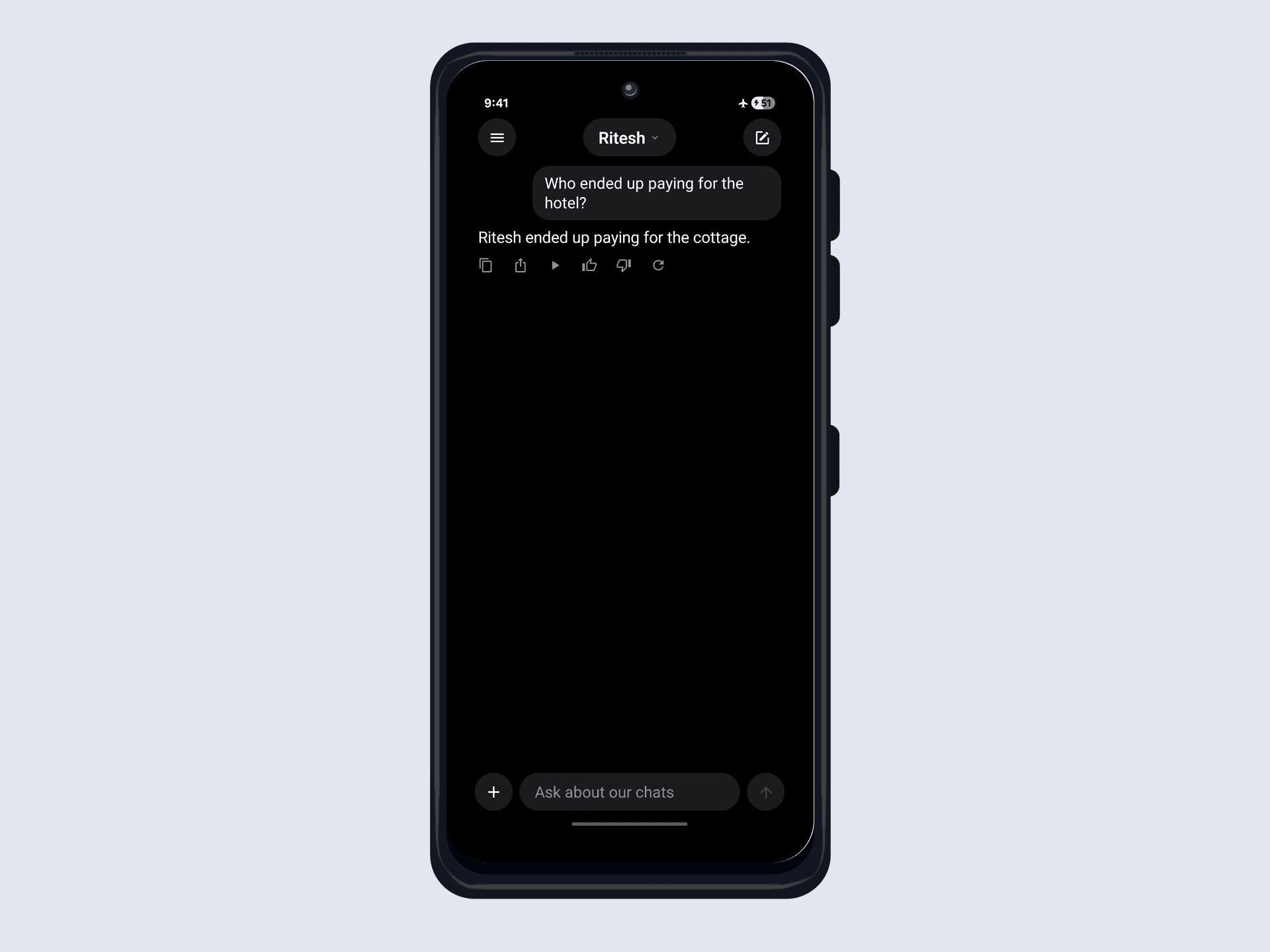
...until you ask a follow-up :(
Real conversations aren't standalone. The next thing you ask is a follow-up:
How much was it?
Answer that on its own (embed "How much was it?", search, generate) and the model has no idea what "it" refers to. The query points at nothing in particular (no hotel, no room, no trip), and a months-long chat is full of amounts: bus tickets, lunch splits, a phone battery. Retrieval drifts to whatever chunk sounds most like the question, and the model, handed a note about the wrong thing, gives up:
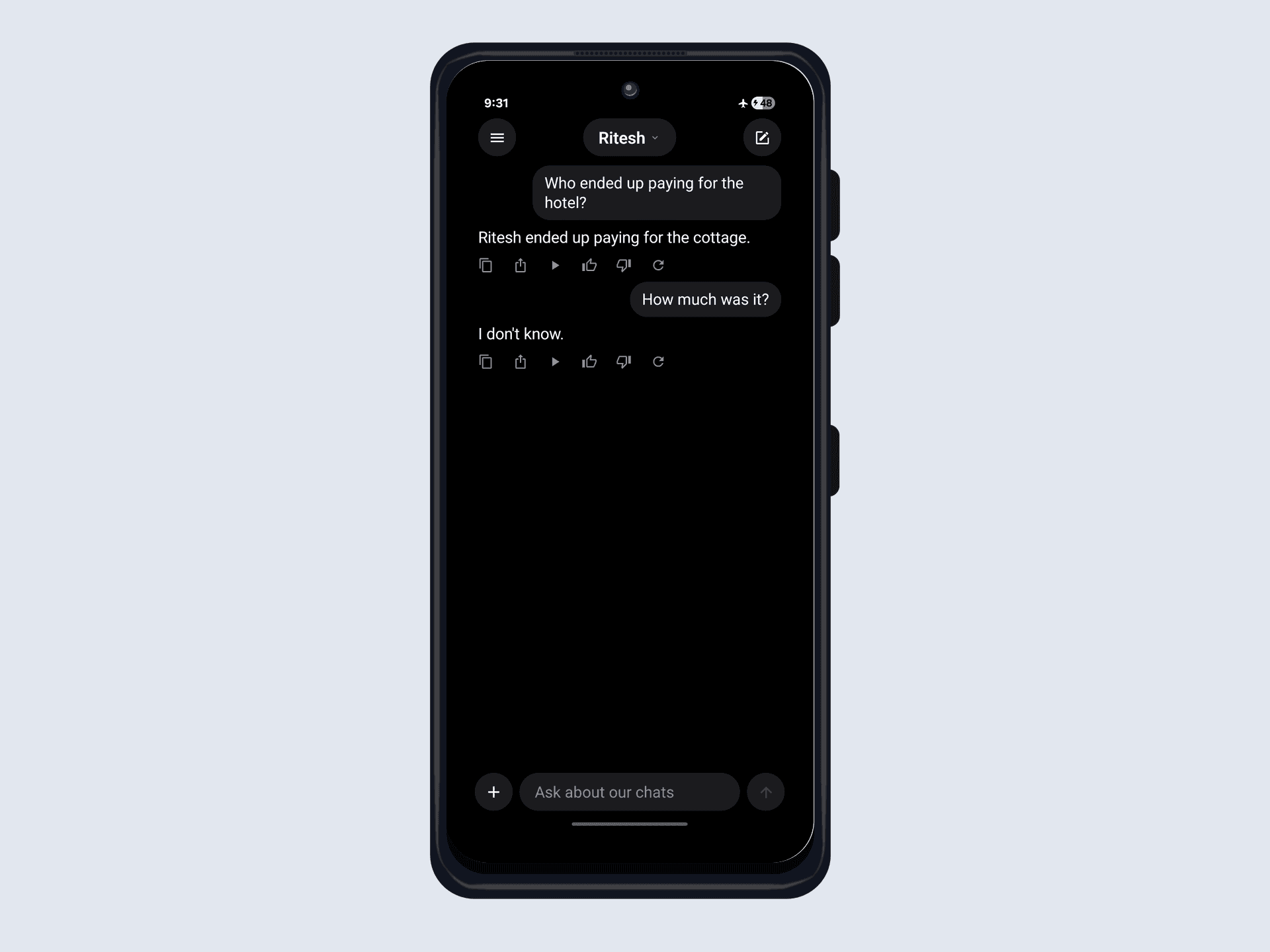
The nearest thing to "How much was it?" in the whole chat is a verbatim "how much was it?" from an unrelated conversation about a phone battery. The retriever hands the model that note; the model, told to answer only from context, can't connect a battery repair to anything and shrugs. On other runs it happily quoted the battery price instead. Either way, the follow-up is lost. The model isn't broken; it just never saw the messages that would have answered it.
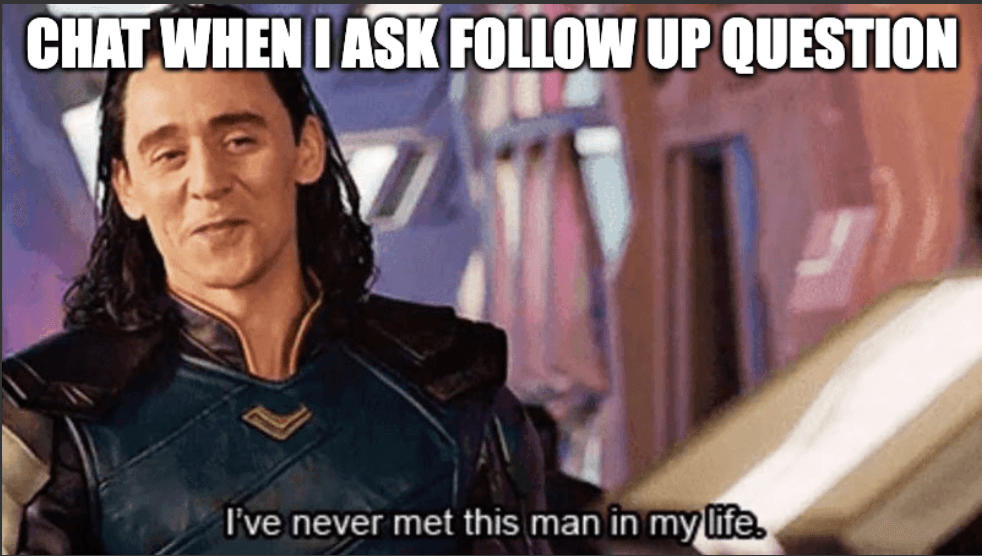
The fix is to carry the conversation forward, in two small changes: let retrieval inherit the previous question, and replay the recent turns to the model so it can resolve "it".
// 1. retrieval inherits the previous question, so "hotel" rides along
const prev = [...history].reverse().find((t) => t.role === 'user')
const chunks = await retrieve(prev ? `${prev.content}\n${question}` : question)

// 2. replay the recent turns so the model knows what "it" is
await qwen.completion({
  messages: [
    { role: 'system', content: SYSTEM_PROMPT },
    ...history.slice(-6),
    { role: 'user', content: `Context:\n${context}\n\nQuestion: ${question}` },
  ],
  // ...same n_predict / temperature / stop as before
})
Same question, same vector DB, now grounded:
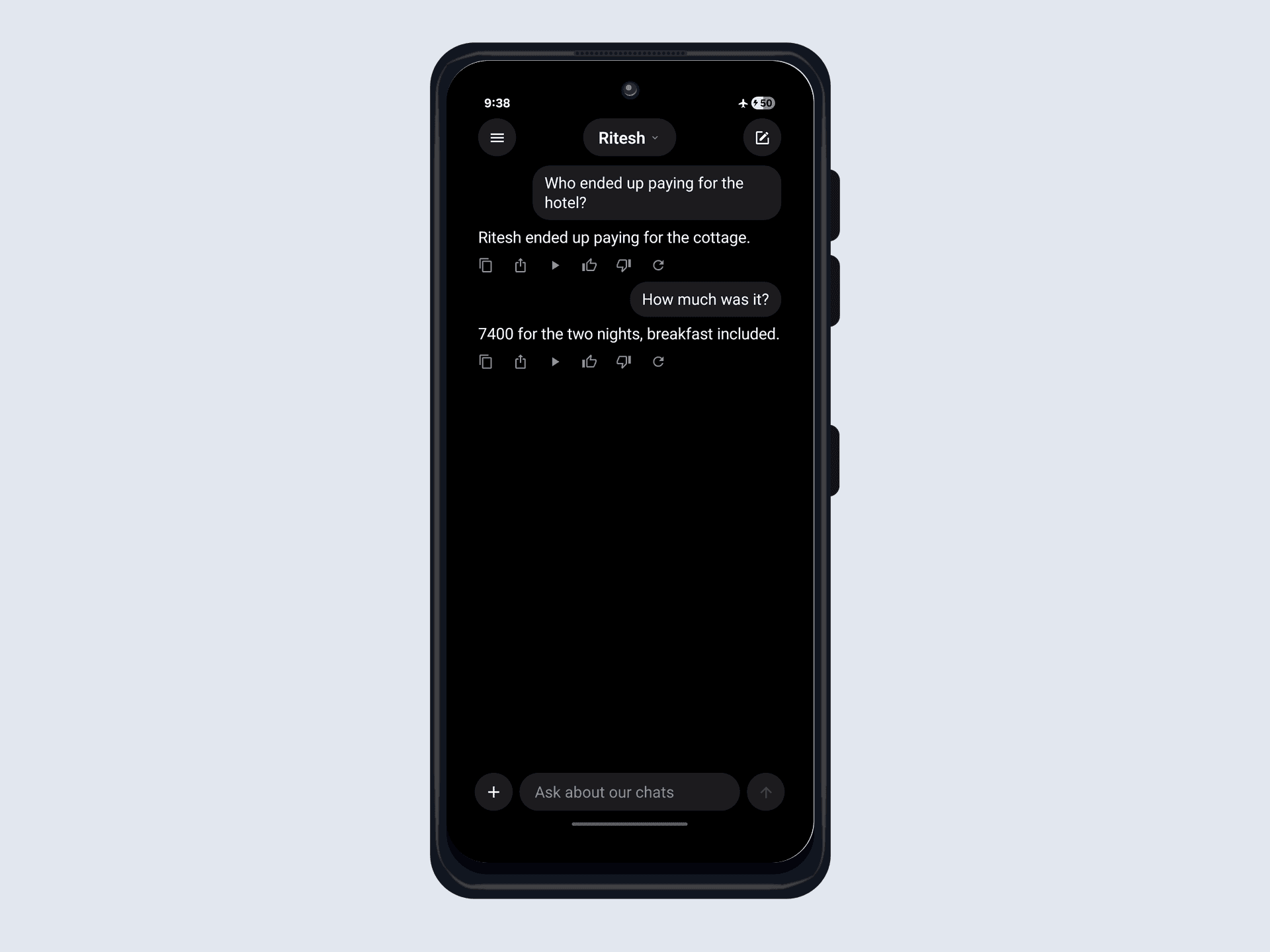
The only thing that changed is that the follow-up remembered what came before.
Vector search beyond LLMs
Step back and look at what we just built, because the interesting half isn't the half that talks. The generator was the chatbot's shakiest link: we spent a system prompt, a stop list, and temperature: 0 just keeping it honest. Everything that actually found the answer - chunk, embed, KNN - never needed a language model at all. Vector search lives mostly in AI apps, but the technique stands alone. Anything you can frame as "find the closest in meaning" fits:
- Recommendations: items whose vectors sit near ones a user liked.
- Deduplication and plagiarism: near-identical documents give near-identical vectors.
- Anomaly detection: the outliers sit unreasonably far from everything else.
So let's put that claim to the test: drop the LLM entirely and keep everything else. The same nitro-sqlite machinery and the same KNN, pointed at a photo gallery instead of a chat log - one you can search by typing, by tapping, or by pointing your camera at something. Fully offline, same as before.
Building on-device image search
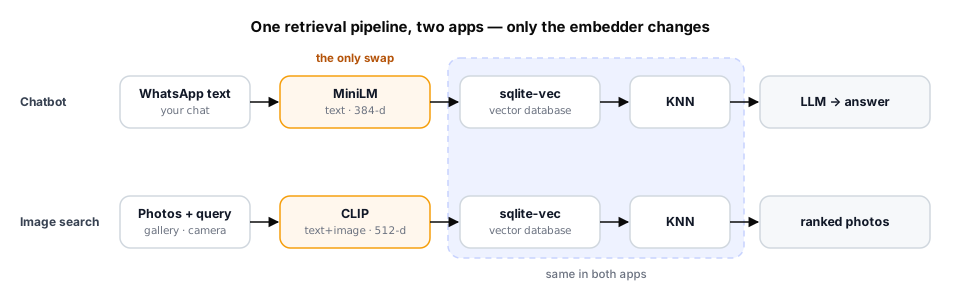
If the chatbot's machinery really carries over untouched, only one piece stands in the way: the embedder. MiniLM only reads text, so it has nothing to say about a photo: an image and the word "dog" never land in the same space, so there's no distance to measure.
Swap MiniLM for CLIP, which embeds images and text into one shared space. (This is the one place the chatbot's single-runtime claim bends: CLIP ships as ONNX rather than GGUF, so this model runs on ONNX Runtime instead of llama.cpp.) A golden retriever photo and the words "a dog" land next to each other, so one table of image vectors buys three searches:
- text → image: type "snowy mountains", embed it, KNN → matching photos.
- image → image: tap a photo, reuse its vector, KNN → similar photos.
- camera → image: shoot a photo (or upload one), embed it on-device, KNN → the gallery photos that look like it.
Let's build a gallery of 1000 photos that does all three, starting with the one table that has to serve all of them.
One table, three searches
Same vec0 table, just wider (CLIP is 512 dimensions), still cosine, the similarity CLIP was trained against. react-native-nitro-sqlite-vec ships typed helpers, so there's no SQL to hand-write for the table or the search:
import { createVectorTable, knnSearch } from 'react-native-nitro-sqlite-vec'

createVectorTable(db, 'images', {
  dimensions: 512,          // CLIP ViT-B/32 output size
  distanceMetric: 'cosine',
  column: 'embedding',
})
Seeding the gallery
Every image needs its vector. You can compute them on the phone with CLIP's vision tower (that's the camera, below), but for a gallery that ships with the app it's nicer to precompute them offline with the same weights and bundle them. 1000 × 512 floats is 2 MB of raw little-endian float32, which we ship base64-encoded and insert in one batch:
db.executeBatch(
  galleryVectors.map((vec, rowid) => ({
    query: 'INSERT INTO images(rowid, embedding) VALUES (?, ?)',
    params: [rowid, JSON.stringify(vec)],
  })),
)
On a low-end phone (a 4 GB moto g35) that seeds all 1000 in ~1.1 s, paid once at first launch, with an array mapping each rowid → image file.
Search by typing (text → image)
Now CLIP's text tower, loaded through react-native-nitro-onnxruntime, a Nitro Module for talking to native ONNX Runtime built by Ronald (a margelo avenger!). Tokenize with CLIP's BPE vocab, embed the query, KNN:
const queryVec = await embedText('snowy mountains')  // clip_text.onnx -> 512 floats
const hits = knnSearch(db, 'images', Array.from(queryVec), 48)  // [{ rowid, distance }]
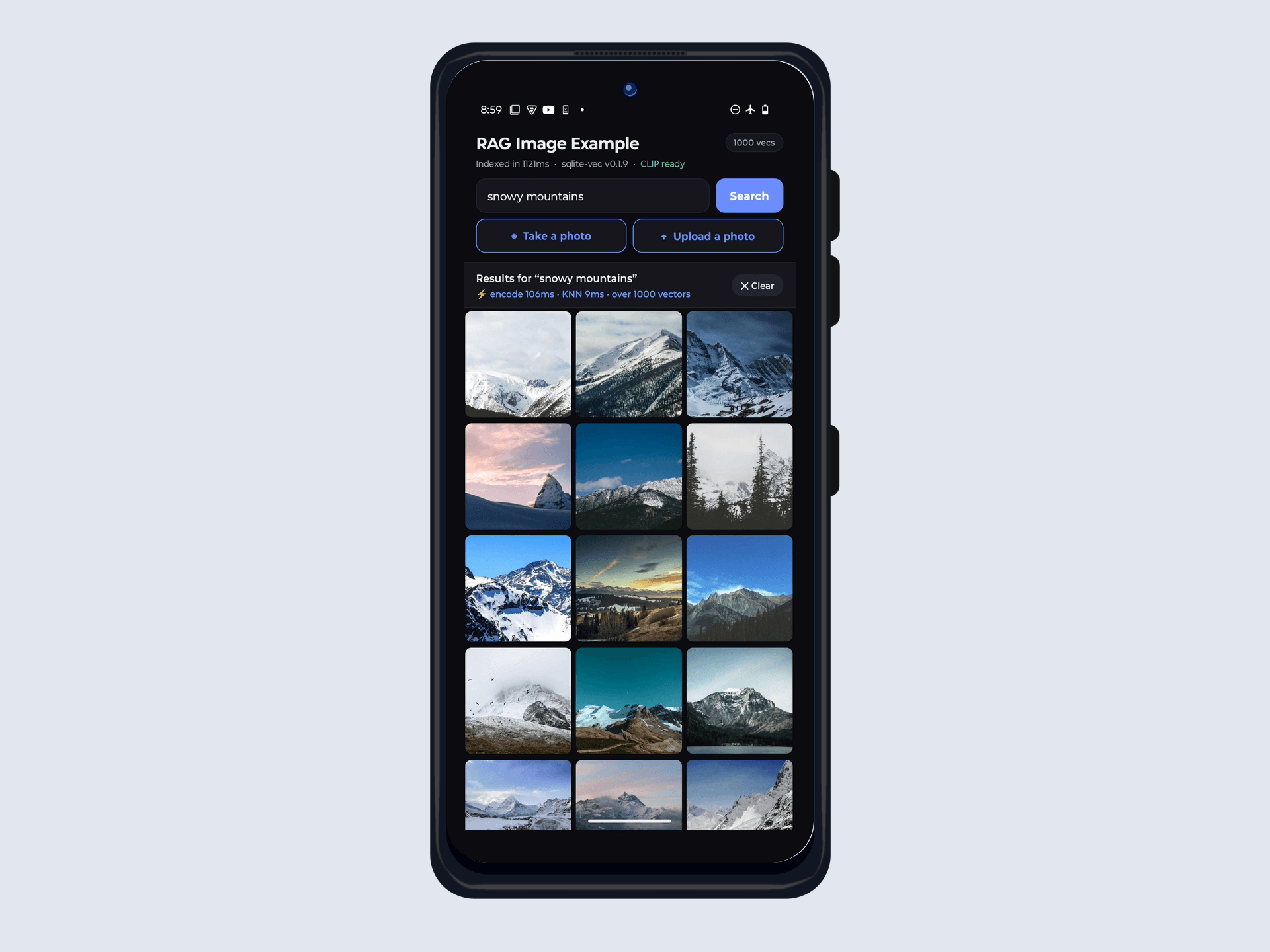
The text tower encodes in ~215 ms, most of which is BPE tokenization and first-run session warmup rather than the network itself (the vision tower below clocks in cheaper); KNN over 1000 vectors comes back in ~8 ms. Nobody typed the word "snow" into a caption anywhere: the match is purely geometric, and it only works because both towers came from the same CLIP model, sharing one space.
Search by tapping (image → image)
No model call at all. The tapped photo's vector is already in the table, so "find similar" is a KNN with a vector we already have. ~5 ms, faster than the tap animation:
// Ask for k+1: hit #0 is always the tapped photo itself, at distance 0.
const hits = knnSearch(db, 'images', Array.from(getEmbedding(rowid)), 49)
const similar = hits.filter((h) => h.rowid !== rowid)
Point the camera at it
The fun part: search by what the camera sees. Typing made its vector from text, and tapping reused one already sitting in the table. The camera is the first time we have to make an image vector on the device, which means running CLIP's vision tower on the phone, and the honest cost isn't the neural network, it's everything around it.
The obvious way to feed a photo to an embedder is to base64 it and pass the string to JS. But a camera frame is several megabytes, and encoding it, copying it across the bridge, then decoding it again wastes time and memory on a phone that has little of either. So VisionCamera v5 captures to a file and hands back a filesystem path. That path never becomes a base64 string: it goes straight to native code.
const photo = await photoOutput.capturePhotoToFile({}, {})
const { vector } = await embedImageFile(photo.filePath)
And a function named embedImageFile is where the work happens:
const image  = await loadImage({ filePath: path })       // platform JPEG decoder
const side   = Math.min(image.width, image.height)
const square = await image.cropAsync(                     // center crop
  (image.width - side) / 2, (image.height - side) / 2, side, side)
const small  = await square.resizeAsync(224, 224)         // CLIP's input size
const raw    = await small.toRawPixelDataAsync()          // { buffer, width, height, pixelFormat }

const pixels = ClipOps.clipNormalize(raw.buffer, raw.width, raw.height, raw.pixelFormat)
const { image_embeds } = await session.runAsync({ pixel_values: pixels })
react-native-nitro-image does the decode, crop and resize with the platform's own decoder, and hands back an ArrayBuffer of raw pixels. That matters for more than speed: it respects EXIF orientation (a portrait photo would otherwise reach CLIP lying on its side) and it reads HEIC, the default on every modern iPhone, which a bundled JPEG decoder simply cannot open.
As the clip shows, the gallery reorders itself around the concept. The shot lands in the same 512-d space as the rest, so it's immediately findable by text search too. The count ticks up to 1001.
Or upload one
The camera and the photo library are the same code path underneath: a picked photo is just another file path, so Upload a photo is launchImageLibrary() feeding the exact same embedImageFile(). That makes it a good way to see what CLIP is really doing.
Here's a photo of some cats on a windowsill, dropped into a gallery of 1000 stock photos that contains, as far as I can tell, exactly one cat:
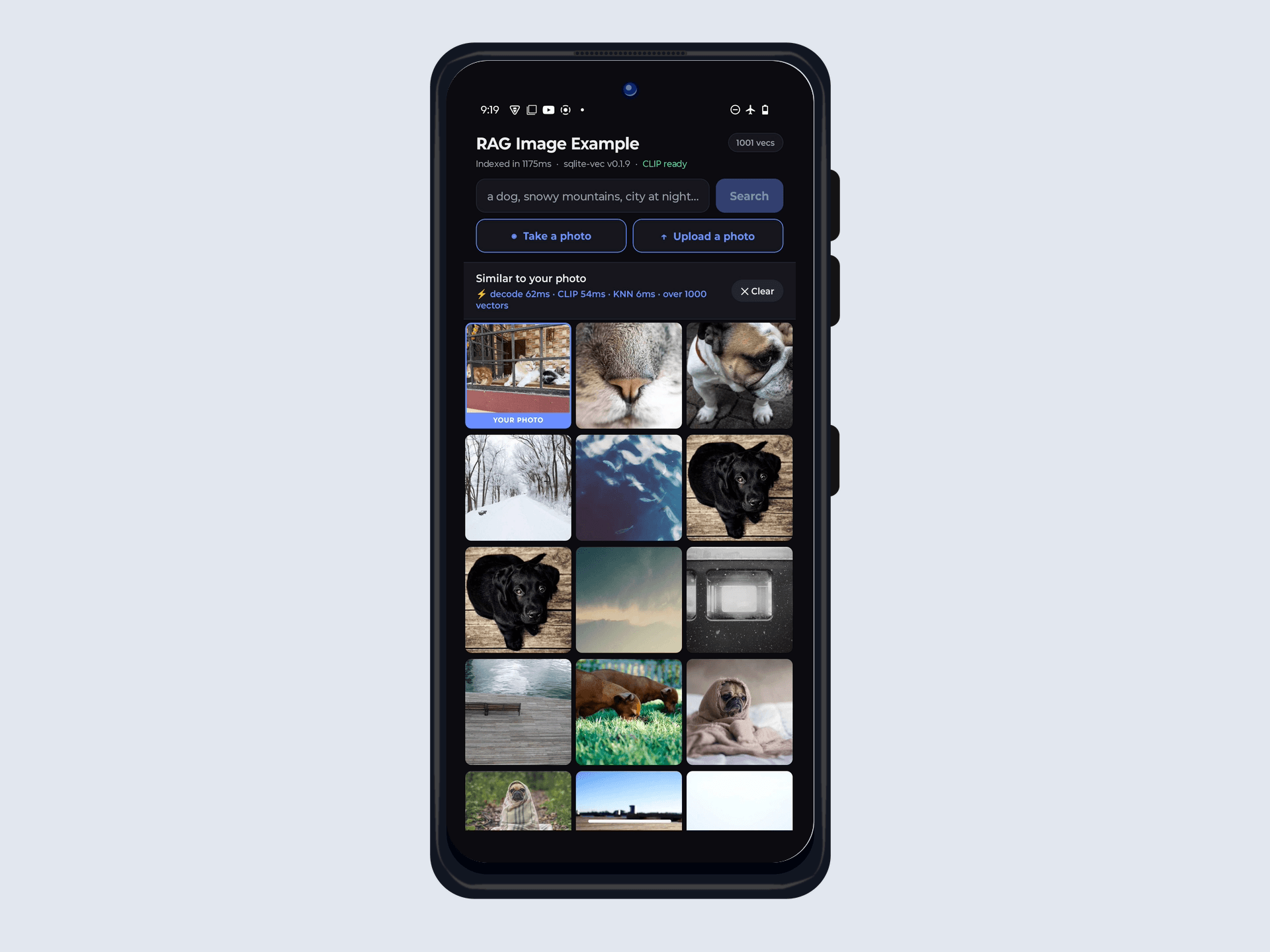
The nearest neighbour is a close-up of a cat's nose. Then it runs out of cats and falls back to bulldogs, black labs, pugs, foxes, pets and small mammals, in descending order of cat-ness. Nothing was tagged "cat", no caption searched: CLIP put the photo somewhere in 512 dimensions, sqlite-vec returned what lives nearby, and "nearby" meant animals with faces. When it can't find the thing, vector search degrades to the closest concept it has instead of returning nothing.
Where next
One direction worth exploring from here, and then some parting thoughts.
GraphRAG
Vector search finds the nearest chunk, but some questions are about connections. "Which trips did we plan but never take?" spans people, events, and several threads, so no single chunk holds the answer. GraphRAG extracts the entities and relationships in your data into a knowledge graph and answers by walking it. Microsoft's From Local to Global paper introduced the technique, and LinkedIn's knowledge graph RAG beat conventional retrieval by 77.6% in MRR.
Photos give you that graph for free: GPS is a place, the timestamp a day, face recognition a person. In SQLite that is two more tables next to the vec0 one, and "photos of Ayush at the beach last summer" becomes a graph walk with vector search handling the fuzzy "beach" part. Still one file, still offline. That build deserves its own post.
Final thoughts
A WhatsApp chatbot and a photo gallery are the same kind of vec0 table and the same KNN, differing only in the embedding model. Once your data is vectors, "search by meaning" becomes a primitive you can point at almost anything, in a SQLite file you already ship, on a $100 phone in airplane mode.
Everything built in this post, the WhatsApp import, chunking, embeddings, vec0 search, lives in one repo you can read end to end. It's built on top of the AI Chat App Demo from the "Building a Native LLM Chat App" blog post:
The one loud failure was Context is full. Most of the rest are silent: a chunker that drops a name, an English-only embedder that mangles a bilingual chat, two byte orders that swap red and blue. All fluent, confident, wrong, and error-free. On-device RAG fails quietly, so suspect the data path long before the model.